An Advent calendar is a good small project for combining CSS 3D transforms with a useful interface. Each door is a hinged plane, the image on its front is one tile of a larger scene, and JavaScript only has to generate the 24 doors and remember which ones are open. The result below uses ordinary document elements throughout, so it remains responsive, keyboard-accessible, and easy to inspect.
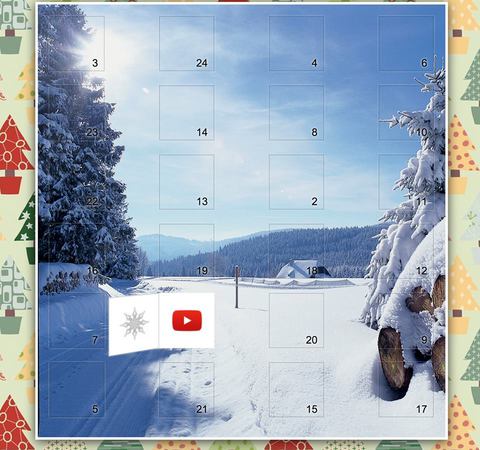
The original 2016 implementation is preserved in the Advent calendar source directory. The implementation here keeps the same transform technique while replacing hover-only interaction, absolute positioning, and injected HTML with buttons, CSS Grid, event delegation, and text-only DOM construction.
Open the Calendar
Every numbered tile is a real button. Click it, focus it and press Enter, or activate it on a touch screen. The open state is stored locally, while the door's aria-expanded value and accessible name are updated together with the animation.
Model One Door
A frame needs three visual layers: the gift on the floor, the front of the moving door, and the back of that door. A button supplies interaction and keyboard behavior without adding a custom control model:
<button class="advent-calendar__cell" type="button" aria-expanded="false">
  <span class="advent-calendar__gift">A handwritten note</span>
  <span class="advent-calendar__door">
    <span class="advent-calendar__face advent-calendar__face--front">1</span>
    <span class="advent-calendar__face advent-calendar__face--back">1</span>
  </span>
</button>
The gift remains stationary. Only .advent-calendar__door rotates, carrying its front and back faces with it. Both faces occupy the same rectangle.
Create the Hinge
Perspective belongs on the cell that observes the rotating door. The door preserves its children in 3D, rotates around its left edge, and hides the reverse side of each face. The back face is turned around before the entire door moves:
.advent-calendar__cell {
  position: relative;
  perspective: 900px;
}

.advent-calendar__door {
  position: absolute;
  inset: 0;
  transform-origin: left center;
  transform-style: preserve-3d;
  transition: transform 650ms cubic-bezier(.2, .7, .2, 1);
}

.advent-calendar__face {
  position: absolute;
  inset: 0;
  backface-visibility: hidden;
}

.advent-calendar__face--back {
  transform: rotateY(180deg);
}

.advent-calendar__cell[aria-expanded="true"] .advent-calendar__door {
  transform: rotateY(-112deg);
}
A rotation slightly beyond 90 degrees exposes the gift without making the door disappear edge-on. The angle is a visual choice rather than a geometric requirement. A reduced-motion media query can replace the transition with an immediate state change while preserving the same control behavior.
Split One Image Across 24 Fronts
Canvas is unnecessary for dividing an image into door-sized pieces. Every front receives the same background image at 400% by 600% of its own size. Its position selects one of four columns and six rows:
.advent-calendar__face--front {
  background-image: url("/image/article/advent/themes/general.jpg");
  background-size: 400% 600%;
  background-position: var(--advent-x) var(--advent-y);
}
The first and last positions on each axis are 0% and 100%; the intermediate columns use one third and two thirds, while the intermediate rows advance in fifths. JavaScript sets those custom properties from the grid coordinates:
const row = Math.floor(index / 4);
const column = index % 4;

button.style.setProperty("--advent-x", `${column / 3 * 100}%`);
button.style.setProperty("--advent-y", `${row / 5 * 100}%`);
Artwork with a 2:3 aspect ratio matches a square 4 by 6 grid without stretching. Other images can be cropped deliberately or paired with a different door aspect ratio. A background on the calendar itself prevents gaps from flashing while images load.
Generate the Grid Safely
Door numbers do not need to follow DOM order. A shuffled array assigns the visible day, while the loop index still identifies the bit used for local state. User-provided gift text belongs in textContent, not innerHTML:
const doorOrder = [3, 24, 4, 6, 23, 14, 8, 10, 22, 13, 2, 11,
  16, 19, 18, 12, 7, 1, 20, 9, 5, 21, 15, 17];

doorOrder.forEach((day, index) => {
  const button = document.createElement("button");
  button.type = "button";
  button.dataset.index = String(index);
  button.dataset.day = String(day);

  const gift = document.createElement("span");
  gift.textContent = gifts[day - 1];
  button.append(gift, createDoor(day));
  calendar.appendChild(button);
});
One delegated click listener on the grid handles all doors. That keeps listener count fixed and also works if the calendar is regenerated.
Remember Open Doors with a Bit Mask
Twenty-four Boolean values fit in the low 24 bits of a JavaScript bitwise integer. Bit i is set when door i is open:
function isDoorOpen(state, index) {
  return Boolean(state & (1 << index));
}

function toggleDoor(state, index) {
  return (state ^ (1 << index)) >>> 0;
}
XOR toggles exactly one bit. The unsigned conversion keeps the serialized decimal state nonnegative, although only bits 0 through 23 are used here. Store that integer in localStorage for a personal calendar or in an authenticated account record when state must follow the user across devices.
Do Not Ship Future Gifts Early
Hiding a future gift with CSS or JavaScript does not keep it secret: anyone can inspect downloaded source or network responses. If future contents matter, the server must omit them until their release date. A PHP endpoint can derive the visible prefix before encoding its response:
$day = min(24, max(0, (int) date("j")));
$visibleGifts = array_slice($gifts, 0, $day);

header("Content-Type: application/json");
echo json_encode($visibleGifts, JSON_THROW_ON_ERROR);
Production code should also verify that the current month is December and use an explicit application time zone. The client may still animate locked doors, but authorization belongs on the server that returns the gift.
Add a One-Stroke Gate
The original calendar included the German one-stroke puzzle commonly called the House of Santa Claus. The graph has eight edges and exactly two odd-degree vertices, so a complete stroke must begin at one lower corner and finish at the other. The native canvas below tracks pointer input and accepts every edge exactly once.
Pointer Events cover mouse, pen, and touch with one event model. The challenge stores visited undirected edges, rejects a duplicate, and succeeds after all eight edges have been traversed. It is a playful gate, not access control: protected calendar data still needs the server-side release rule above.
Finish the Production Version
- Use buttons for doors so keyboard and assistive-technology behavior is available without reimplementation.
- Update
aria-expandedand the accessible name whenever a door changes state. - Keep text contrast independent of the chosen background image.
- Honor
prefers-reduced-motionand never require hover to reveal a gift. - Build gift contents with DOM methods and
textContentunless trusted markup has been sanitized. - Enforce dates and authorization on the server whenever unreleased contents must remain private.