The Arcball or Trackball is an elegant and intuitive way to rotate and manipulate a three-dimensional scene with the mouse. The idea was proposed by Ken Shoemake [Shoemake], and it is simple enough to implement that it became the standard way to rotate objects in many 3D environments.
The Trackball handles the problem of a pointing device living in 2D and a virtual object in 3D by pretending there is a sphere behind the screen. When you drag, you rotate that sphere around its center together with the objects attached to it. In this WYSIWYG setup, the scene follows the direction of the mouse. On a touch screen it feels even more natural.
With Trackball.js you can implement a virtual Trackball directly with HTML5 and CSS3.
Mathematical Derivation of an Arcball
Transform mouse coordinates to canonical space
Let the cursor position \(P\) be in the viewport space, typically in the x-y plane:
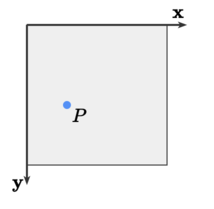
Now convert the screen coordinates (in pixels) to the canonical space by scaling down the mouse coordinate from the range of \([0\dots\text{width})\), \([0\dots\text{height}\)) to \([-1...1]\), \([1...-1]\).
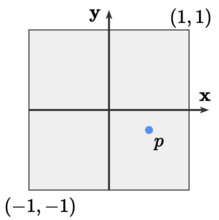
To do so, we subtract the screen center \(C = \frac{1}{2}(\text{width} - 1, \text{height} - 1)\), divide the result by the smallest scale \(s=\min(\text{width}, \text{height}) - 1\) to get the largest circle in the viewport (or individually divide by \(\text{width} - 1\) and \(\text{height} - 1\) to get an ellipse). The scaled down point (lower case) \(p\) is thus
\[\begin{array}{rl} p_x &= +\frac{2}{s}(P_x - C_x) = +\frac{1}{s}(2P_x - \text{width} + 1)\\ p_y &= -\frac{2}{s}(P_y - C_y) = -\frac{1}{s}(2P_y - \text{height} + 1) \end{array}\]
Project the position to a hemi-sphere
The first step is to define the ball itself. We use a sphere at the origin:
\[x^2 + y^2 + z^2 = r^2\]
Now we project the mouse position onto a hemi-sphere. Given a point \(p\) and a radius \(r\in(0, 1]\) (usually 1), the depth is
\[z(p_x, p_y) = \sqrt{r^2 - p_x^2 - p_y^2}\]
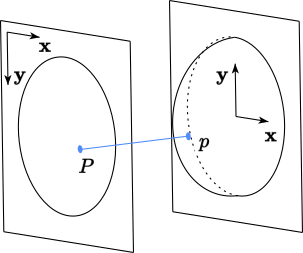
We now use the canonical point \(p\) and the depth information on the sphere \(z(p_x, p_y)\) to form a three dimensional vector from the origin \(\mathcal{O}=(0,0,0)\):
\[\mathbf{p} = (p_x, p_y, z(p_x, p_y))\]
Fixing points outside the hemi-sphere
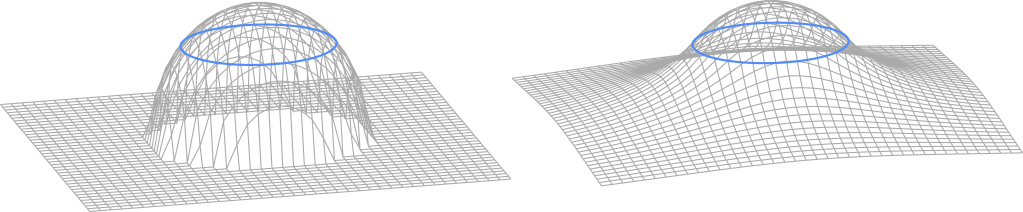
When the click lands outside the sphere, \(z\) would become complex because the square root turns negative. The usual fallback is to set \(z(p_x, p_y)=0\) when \(p_x^2 + p_y^2 > r^2\), which was also proposed in the original paper. That gives a rotation around the axis, but it is not very smooth and feels more like a bug.
A better option is to switch to a piecewise function instead of relying on the sphere alone. A common choice is the hyperbolic function
\[f(x, y) = \frac{r^2/2}{\sqrt{x^2 + y^2}}\]
\(f\) and \(z\) intersect on the circle with radius \(\frac{r}{\sqrt{2}}\) (equivalently \(x^2+y^2=r^2/2\)). When combining the individual functions we get a smooth corrected z-coordinate:
\[z(x, y) = \begin{cases} \sqrt{r^2 - x^2 - y^2} &\text{if } x^2 + y^2\leq r^2/2 \\ \frac{r^2/2}{\sqrt{x^2 + y^2}} &\text{else } \end{cases}\]
The closer you get to the edge of the sphere, the less stable the surface normal becomes. The corrected function is much smoother there:
Handling mouse motion on the hemi-sphere
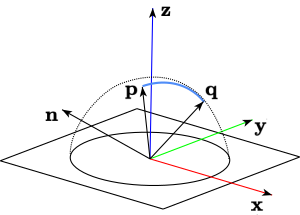
Suppose we already have the mouse-down vector \(\mathbf{p}\) on the hemi-sphere. For each mouse-move event, we compute a second vector \(\mathbf{q}\) the same way until the mouse button is released.
To create a great arc, which is the shortest path on the sphere, we take the cross product of \(\mathbf{p}\) and \(\mathbf{q}\). That gives the rotation axis, which is orthogonal to both vectors.
The angle \(\theta\) between \(\mathbf{p}\) and \(\mathbf{q}\) comes from the dot product.
\[\begin{array}{rl} \theta &= \cos^{-1}\left(\operatorname{clamp}\left(\frac{\mathbf{p}\cdot\mathbf{q}}{|\mathbf{p}||\mathbf{q}|}, -1, 1\right)\right)\\ \mathbf{n} &= \mathbf{p}\times\mathbf{q} \end{array}\]
Note that \(|\mathbf{p}|=|\mathbf{q}|=1\) is only true on the sphere when we choose \(r=1\). Once the hyperbolic correction comes in, the length changes. The same is true for \(\mathbf{n}\), which is not unit length even when \(\mathbf{p}\) and \(\mathbf{q}\) are normalized.
Using Quaternions as representation
A quaternion is a more elegant way to represent rotations in space compared to rotation matrices. In the axis-angle view, it is a direction vector plus a rotation angle around that vector. So every 3D rotation fits into four numbers: the vector \(\mathbf{n}=(x,y,z)\) and a scalar \(w\). A unit quaternion (versor) \(\mathbf{Q}\) then describes a rotation with
\[\mathbf{Q} = \left(\cos\frac{\theta}{2}, \sin\frac{\theta}{2}\hat{\mathbf{n}}\right)\]
That formula contains \(\sin\) and \(\cos\), but in practice the computation can be reduced to multiplications and additions. A rotation is then a quaternion multiplication instead of a matrix multiplication:
\[\mathbf{Q_1\times Q_2} := (w_1w_2 - \mathbf{n_1}\cdot \mathbf{n_2}, w_1\mathbf{n_2} + w_2\mathbf{n_1}+\mathbf{n_1}\times\mathbf{n_2})\]
\(\mathbf{n_1}\times\mathbf{n_2}\) here is the 3D vector cross product, which is the reason that quaternion multiplication is not commutative!
The inverse rotation \(\mathbf{Q}^{-1}\) is equal to the conjugate \(\overline{\mathbf{Q}}\), which is flipping over the imaginary part:
\[\overline{\mathbf{Q}}:= (w, -\mathbf{n})\]
The last step that is necessary to do with our quaternion is to apply it to all objects the Trackball controls. To do so, we embed our vector \(\mathbf{v}\) we want to rotate into a quaternion and rotate it with two quaternion multiplications:
\[Rot(\mathbf{v}):= \mathbf{Q}\times(0, \mathbf{v})\times\overline{\mathbf{Q}}\]
The double multiplication is only the textbook version. In practice, rotating vectors using quaternions can be optimized further. Quaternion.js takes care of the details if you do not want to write that part yourself.
Summary
\[\begin{array}{rl} z(x, y) &= \begin{cases} \sqrt{r^2 - x^2 - y^2} &\text{if } x^2 + y^2\leq r^2/2 \\ \frac{r^2/2}{\sqrt{x^2 + y^2}} &\text{else }\\ \end{cases}\\ \mathbf{p} &= (p_x, p_y, z(p_x, p_y))\\ \mathbf{q} &= (q_x, q_y, z(q_x, q_y))\\ \theta &= \cos^{-1}\left(\operatorname{clamp}(\hat{\mathbf{p}}\cdot\hat{\mathbf{q}}, -1, 1)\right)\\ \mathbf{n} &= \mathbf{p}\times\mathbf{q}\\ \mathbf{Q} &= \left(\cos\frac{\theta}{2}, \sin\frac{\theta}{2}\hat{\mathbf{n}}\right) \end{array}\]
Where \(\hat{\mathbf{v}}:= \frac{\mathbf{v}}{|\mathbf{v}|}\) is the normalized vector of \(\mathbf{v}\). A good quaternion library will usually expose something like fromVectors to compute \(\mathbf{Q}\) directly from \(\mathbf{p}\) and \(\mathbf{q}\), as it is possible to optimize this step tremendously.
Numerical stability in production
To make Arcball interaction robust in real applications, use a few practical safeguards:
- Clamp dot products to \([-1, 1]\) before applying \(\cos^{-1}\) to avoid NaNs from floating-point drift.
- If \(|\mathbf{p}\times\mathbf{q}|\) is near zero, skip the update and keep the previous orientation.
- Normalize intermediate vectors and periodically normalize the accumulated quaternion.
- Use pointer capture during drag to keep updates consistent when leaving the viewport.
- Recompute viewport bounds on resize and device-pixel-ratio changes.
Conventions used in this article
- Right-handed coordinates: \(+x\) right, \(+y\) up in canonical space, \(+z\) towards the viewer.
- Canonical mapping uses the largest inscribed circle via \(s=\min(\text{width},\text{height})-1\).
- Drag rotation is computed from current pointer vector against the drag-start vector.
- Orientation is accumulated as \(Q_{new}=Q_{drag}\times Q_{last}\) (left-multiplication).
- Released state is stored in \(Q_{last}\), while \(Q_{drag}\) is reset to identity.
JavaScript and CSS3 Implementation
The whole math is implemented in Trackball.js, a small library building on top of Quaternion.js.
Implementation scheme
If you want to implement the Arcball yourself, the pseudocode below is enough to get started.
function init() {
  sphereRadius = 1
  baseRotation = Quaternion.ONE
  dragRotation = Quaternion.ONE
  dragStart = null
  viewport = measureViewport() // { width, height }
}

function pointerdown(px, py) {
  dragStart = { x: px, y: py }
}

function pointermove(px, py) {
  if (dragStart == null) return

  from = projectToArcball(dragStart.x, dragStart.y)
  to = projectToArcball(px, py)

  axis = cross(from, to)
  if (length(axis) == 0) {
    dragRotation = Quaternion.ONE
    return
  }

  cosTheta = dot(normalize(from), normalize(to))
  theta = acos(clamp(cosTheta, -1, 1))

  dragRotation = Quaternion.fromAxisAngle(normalize(axis), theta)
}

function pointerup() {
  if (dragStart == null) return

  baseRotation = dragRotation.mul(baseRotation)
  dragRotation = Quaternion.ONE
  dragStart = null
}

function projectToArcball(px, py) {
  scale = min(viewport.width, viewport.height) - 1

  x = (2 * px - viewport.width + 1) / scale
  y = (viewport.height - 1 - 2 * py) / scale

  radial2 = x * x + y * y
  radius2 = sphereRadius * sphereRadius

  if (2 * radial2 <= radius2)
    z = sqrt(radius2 - radial2)
  else
    z = (radius2 / 2) / sqrt(radial2)

  return normalize([x, y, z])
}

function onResize() {
  viewport = measureViewport()
}

function draw() {
  currentRotation = dragRotation.mul(baseRotation)
  rotatedObject = currentRotation.rotateVector(object)
}
References
- Shoemake Ken Shoemake (1992) ARCBALL: A User Interface for Specifying Three-Dimensional Orientation Using a Mouse
- Henriksen Knud Henriksen (2004) Virtual Trackballs Revisited