A NEO-6M receiver can give a Raspberry Pi position, UTC time, speed, and satellite status without consuming a USB port. The receiver sends NMEA 0183 sentences over a 3.3 V UART; the work is mostly correct wiring, releasing the serial port from the Linux console, and rejecting incomplete or corrupt fixes in software.
Hardware and Compatibility
This setup uses a GY-NEO6MV2-style breakout containing a u-blox NEO-6M receiver. It applies directly to Raspberry Pi models that expose their primary UART on GPIO 14 and GPIO 15, including the common 40-pin Raspberry Pi 1 through 4 and Zero layouts. Raspberry Pi 5 exposes its primary UART on the dedicated debug header by default; configure an RP1 UART for GPIO 14 and GPIO 15 before using the same header wiring there.
Raspberry Pi UART pins use 3.3 V logic and are not 5 V tolerant. The NEO-6M itself also uses 3.3 V I/O. Some breakout boards accept a higher supply voltage through an onboard regulator, but that does not make their serial signals 5 V safe. The conservative connection below powers the breakout from 3.3 V.
Parts
- Raspberry Pi with a 40-pin GPIO header
- GY-NEO6MV2 or compatible NEO-6M breakout with antenna
- Female-to-female jumper wires
Wiring
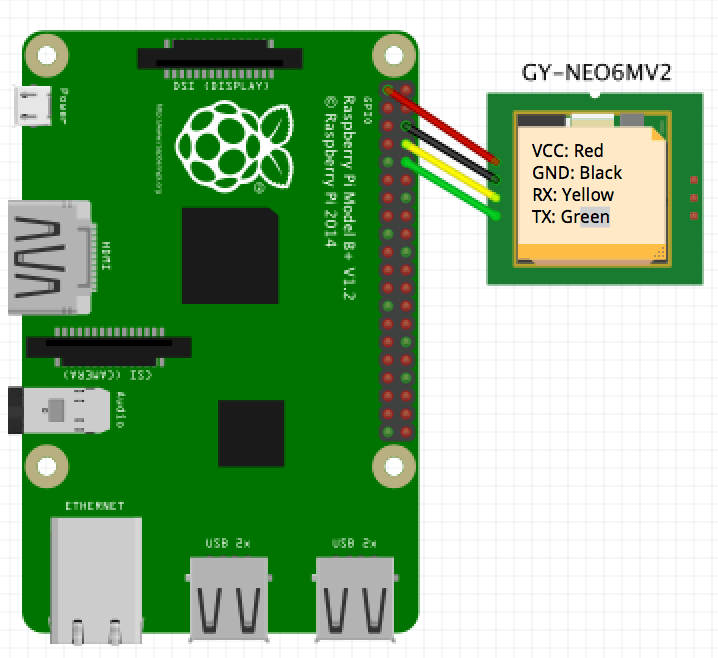
| GPS module | Raspberry Pi | Header pin |
|---|---|---|
| VCC | 3.3 V | Pin 1 |
| GND | Ground | Pin 6 |
| TX | GPIO 15 / RXD | Pin 10 |
| RX | GPIO 14 / TXD | Pin 8, optional |
Serial lines cross: the module's transmitter connects to the Pi's receiver. The module RX connection is unnecessary when the Pi only reads NMEA output. Switch off the Pi before changing the wiring.
Release the UART
Raspberry Pi OS can use the primary UART for a login console. Keep the UART hardware enabled but detach that console:
sudo raspi-config
Open Interface Options, choose Serial Port, answer No when asked whether a login shell should be accessible over serial, then answer Yes when asked whether the serial port hardware should be enabled. Reboot after leaving the tool:
sudo reboot
Use Raspberry Pi OS's stable alias instead of hard-coding /dev/ttyAMA0 or /dev/ttyS0. The hardware behind the alias differs by model and configuration:
ls -l /dev/serial0
If the process runs under an account without serial access, add that account to dialout, then log out and back in:
sudo usermod -a -G dialout "$USER" Verify the Receiver
Most NEO-6M breakouts ship at 9600 baud with 8 data bits, no parity, and one stop bit. Configure the terminal and inspect a short sample:
stty -F /dev/serial0 9600 raw -echo
timeout 10 cat /dev/serial0
Working transport produces lines beginning with talker and sentence identifiers such as $GPGGA, $GPRMC, or $GPGSV. Empty coordinates do not indicate a broken UART; they usually mean the receiver has not acquired a fix. No readable lines at all point instead to crossed wiring, the wrong serial device, a disabled UART, or a non-default module baud rate.
Parse NMEA with Node.js
The GPS.js NMEA parser accepts arbitrary serial chunks, validates checksums, and emits structured sentence objects. Install it with the current SerialPort package:
npm install gps serialport
Save the following as gps.mjs:
import GPS from 'gps';
import { SerialPort } from 'serialport';

const gps = new GPS();
const port = new SerialPort({
  path: '/dev/serial0',
  baudRate: 9600,
});

gps.on('data', (message) => {
  if (!message.valid) {
    console.warn('Discarding sentence with invalid checksum:', message.raw);
    return;
  }

  if (message.type === 'GGA' && message.quality !== null) {
    console.log({
      latitude: message.lat,
      longitude: message.lon,
      altitude: message.alt,
      satellites: message.satellites,
      hdop: message.hdop,
    });
  }
});

port.on('data', (chunk) => {
  try {
    gps.updatePartial(chunk.toString('ascii'));
  } catch (error) {
    console.error('Malformed NMEA sentence:', error.message);
  }
});
port.on('error', (error) => console.error('Serial port error:', error.message));

process.on('SIGINT', () => {
  port.close(() => process.exit(0));
});
updatePartial() matters because a serial read is only a chunk of bytes: it may end halfway through one NMEA sentence or contain several sentences at once. GPS.js buffers those boundaries. The checksum test then prevents damaged UART data from becoming a position, while the GGA fix-quality check keeps an empty acquisition message from being mistaken for a valid location.
Getting the First Fix
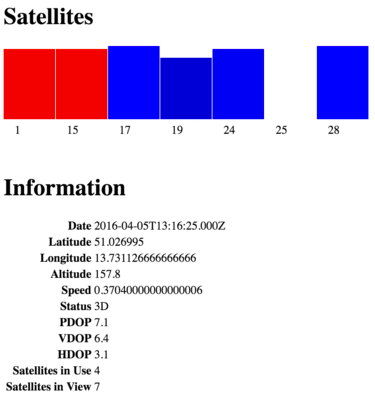
Place the antenna outdoors or at a window with a broad view of the sky and keep it still. A cold start can take several minutes because the receiver must obtain time and orbital data before solving a position. The module's fix LED commonly changes its blink pattern after acquisition, but the parsed fix quality and satellite count are the reliable application-level signals.
If NMEA sentences arrive but no fix appears, leave the receiver powered with a clear sky view before changing code. If checksums repeatedly fail, shorten the wires, confirm a shared ground, and verify that no 5 V serial source is connected to the Pi.
References
- [RaspberryPi]Raspberry Pi Documentation: Configuring UARTs.
- [u-blox]u-blox NEO-6 Data Sheet.
- [NMEA]NMEA 0183 Standard.